Chapter 1: Introduction
Introduction
web2py[web2py] is a free, open-source web framework for agile development of secure database-driven web applications; it is written in Python[python] and programmable in Python. web2py is a full-stack framework, meaning that it contains all the components you need to build fully functional web applications.
web2py is designed to guide a web developer to follow good software engineering practices, such as using the Model View Controller (MVC) pattern. web2py separates the data representation (the model) from the data presentation (the view) and also from the application logic and workflow (the controller). web2py provides libraries to help the developer design, implement, and test each of these three parts separately, and makes them work together.
web2py is built for security. This means that it automatically addresses many of the issues that can lead to security vulnerabilities, by following well established practices. For example, it validates all input (to prevent injections), escapes all output (to prevent cross-site scripting), renames uploaded files (to prevent directory traversal attacks). web2py takes care of main security issues, so developers have less chances of introducing vulnerabilities.
web2py includes a Database Abstraction Layer (DAL) that writes SQL[sql-w] dynamically so that you, the developer, don't have to. The DAL knows how to generate SQL transparently for SQLite[sqlite], MySQL[mysql], PostgreSQL[postgres], MSSQL[mssql], FireBird[firebird], Oracle[oracle], IBM DB2[db2], Informix[informix] and Ingres[ingresdb].
The DAL can also generate function calls for the Google Datastore when running on the Google App Engine (GAE)[gae]. Experimentally we support more databases and new ones are constantly added. Please check on the web2py web site and mailing list for more recent adapters. Once one or more database tables are defined, web2py automatically generates a fully functional web-based database administration interface to access the database and the tables.
web2py differs from other web frameworks in that it is the only framework to fully embrace the Web 2.0 paradigm, where the web is the computer. In fact, web2py does not require installation or configuration; it runs on any architecture that can run Python (Windows, Windows CE, Mac OS X, iOS, and Unix/Linux), and the development, deployment, and maintenance phases for the applications can be done via a local or remote web interface. web2py runs with CPython (the C implementation) and PyPy (Python written in Python), on Python 2.7 and Python 3.
web2py provides a ticketing system for error events. If an error occurs, a ticket is issued to the user, and the error is logged for the administrator.
web2py is open source and released under the LGPL version 3 license.
Another important feature of web2py is that we, its developers, commit to maintain backward compatibility in future versions. We have done so since the first release of web2py in October, 2007. New features have been added and bugs have been fixed, but if a program worked with web2py 1.0, that program will work even better today.
Here are some examples of web2py statements that illustrate its power and simplicity. The following code:
db.define_table('person', Field('name'), Field('image', 'upload'))
creates a database table called "person" with two fields: "name", a string; and "image", something that needs to be uploaded (the actual image). If the table already exists but does not match this definition, it is altered appropriately.
Given the table defined above, the following code:
form = SQLFORM(db.person).process()
creates an insert form for this table that allows users to upload images. It also validates the submitted form, renames the uploaded image in a secure way, stores the image in a file, inserts the corresponding record in the database, prevents double submission, and eventually modifies the form itself by adding error messages if the data submitted by the user does not pass validation.
This code embeds a fully working wiki with tags, search, tag cloud, permissions, media attachments, and oembed support:
def index(): return auth.wiki()
The following code instead:
@auth.requires_permission('read', 'person')
def f(): ....
prevents visitors from accessing the function f unless the visitor is a member of a group whose members have permissions to "read" records of table "person". If the visitor is not logged in, the visitor gets directed to a login page (provided by default by web2py).
web2py also supports components, i.e. actions which can be loaded in a view and interact with the visitor via Ajax without re-loading the entire page. This is done via a LOAD helper which allows very modular design of applications; it is discussed in chapter 3 in the context of the wiki and, in some detail, in the last chapter of this book.
This 6th edition of the book describes web2py 2.4.1 and later versions.
Principles
Python programming typically follows these basic principles:
- Don't repeat yourself (DRY).
- There should be only one way of doing things.
- Explicit is better than implicit.
web2py fully embraces the first two principles by forcing the developer to use sound software engineering practices that discourage repetition of code. web2py guides the developer through almost all the tasks common in web application development (creating and processing forms, managing sessions, cookies, errors, etc.).
web2py differs from other frameworks with regard to the third principle, which sometimes conflicts with the other two. In particular, web2py does not import user applications, but executes them in a predefined context. This context exposes the Python keywords, as well as the web2py keywords.
To some this may appear as magic, but it should not. Simply, in practice, some modules are already imported without you doing so. web2py is trying to avoid the annoying characteristic of other frameworks that force the developer to import the same modules at the top of every model and controller.
web2py, by importing its own modules, saves time and prevents mistakes, thus following the spirit of "don't repeat yourself" and "there should be only one way of doing things".
If the developer wishes to use other Python modules or third-party modules, those modules must be imported explicitly, as in any other Python program.
Web frameworks
At its most fundamental level, a web application consists of a set of programs (or functions) that are executed when the corresponding URL is visited. The output of the program is returned to the visitor and rendered by the browser.
The purpose of web frameworks is to allow developers to build new apps quickly, easily and without mistakes. This is done by providing APIs and tools that reduce and simplify the amount of coding that is required.
The two classic approaches for developing web applications are:
The first model is the one that was followed, for example, by early CGI scripts. The second model is followed, for example, by PHP[php] (where the code is in PHP, a C-like language), ASP (where the code is in Visual Basic), and JSP (where the code is in Java).
Here is an example of a PHP program that, when executed, retrieves data from a database and returns an HTML page showing the selected records:
<html><body><h1>Records</h1><?
  mysql_connect(localhost,username,password);
  @mysql_select_db(database) or die( "Unable to select database");
  $query="SELECT * FROM contacts";
  $result=mysql_query($query);
  mysql_close();
  $i=0;
  while ($i < mysql_numrows($result)) {
    $name=mysql_result($result,$i,"name");
    $phone=mysql_result($result,$i,"phone");
    echo "<b>$name</b><br>Phone:$phone<br /><br /><hr /><br />";
    $i++;
  }
?></body></html>
The problem with this approach is that code is embedded into HTML, but the very same code also needs to generate additional HTML and to generate SQL statements to query the database, entangling multiple layers of the application and making it difficult to read and maintain. The situation is even worse for Ajax applications, and the complexity grows with the number of pages (files) that make up the application.
The functionality of the above example can be expressed in web2py with two lines of Python code:
def index():
    return HTML(BODY(H1('Records'), db().select(db.contacts.ALL)))
In this simple example, the HTML page structure is represented programmatically by the HTML, BODY, and H1 objects; the database db is queried by the select command; finally, everything is serialized into HTML. Notice that db is not a keyword but a user defined variable. We will use this name consistently to refer to a database connection to avoid confusion.
Web frameworks are typically categorized as one of two types: A "glued" framework is built by assembling (gluing together) several third-party components. A "full-stack" framework is built by creating components designed specifically to be tightly integrated and work together.
web2py is a full-stack framework. Almost all of its components are built from scratch and are designed to work together, but they function just as well outside of the complete web2py framework. For example, the Database Abstraction Layer (DAL) or the template language can be used independently of the web2py framework by importing gluon.dal or gluon.template into your own Python applications. gluon is the name of the web2py module that contains system libraries. Some web2py libraries, such as building and processing forms from database tables, have dependencies on other portions of web2py. web2py can also work with third-party Python libraries, including other template languages and DALs, but they will not be as tightly integrated as the original components.
Model-View-Controller
web2py encourages the developer to separate data representation (the model), data presentation (the view) and the application workflow (the controller). Let's consider again the previous example and see how to build a web2py application around it. Here is an example of the web2py MVC edit interface:
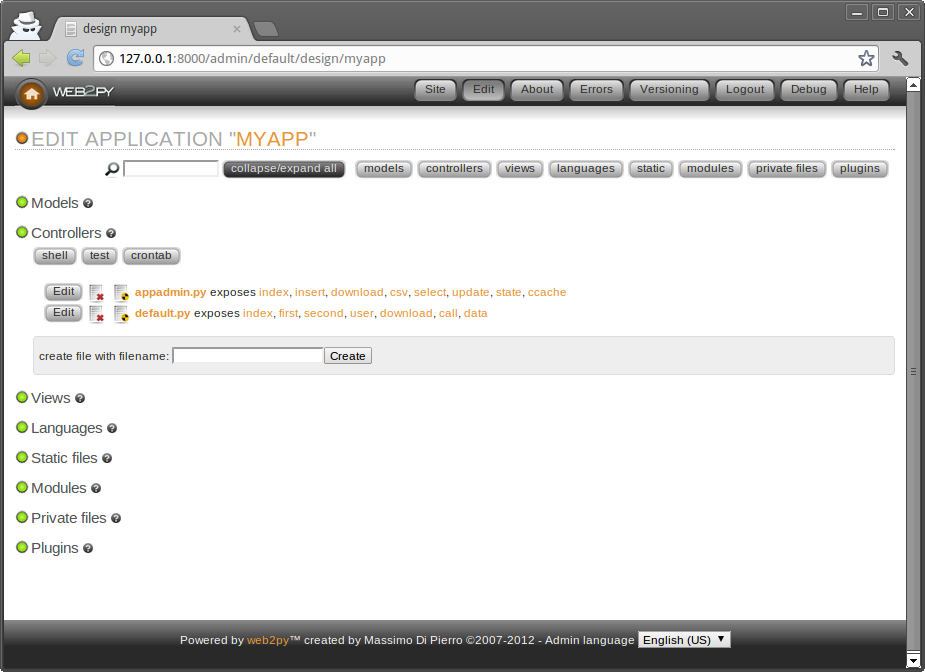
The typical workflow of a request in web2py is described in the following diagram:

In the diagram:
- The Server can be the web2py built-in web server or a third-party server, such as Apache. The Server handles multi-threading.
- "main" is the main WSGI application. It performs all common tasks and wraps user applications. It deals with cookies, sessions, transactions, URL routing and reverse routing, and dispatching.
It can serve and stream static files if the web server is not doing it yet.
- The Models, Views and Controller components make up the user application.
- Multiple applications can be hosted in the same web2py instance.
- The dashed arrows represent communication with the database engine(s). The database queries can be written in raw SQL (discouraged) or by using the web2py Database Abstraction Layer (recommended), so that web2py application code is not dependent on the specific database engine.
- The dispatcher maps the requested URL to a function call in the controller. The output of the function can be a string or a dictionary of symbols (a hash table). The data in the dictionary is rendered by a view. If the visitor requests an HTML page (the default), the dictionary is rendered into an HTML page. If the visitor requests the same page in XML, web2py tries to find a view that can render the dictionary in XML. The developer can create views to render pages in any of the already supported protocols (HTML, XML, JSON, RSS, CSV, and RTF) or in additional custom protocols.
- All calls are wrapped into a transaction, and any uncaught exception causes the transaction to be rolled back. If the request succeeds, the transaction is committed.
- web2py also handles sessions and session cookies automatically, and when a transaction is committed, the session is also stored, unless specified otherwise.
- It is possible to register recurrent tasks (via cron) to run at scheduled times and/or after the completion of certain actions. In this way it is possible to run long and compute-intensive tasks in the background without slowing down navigation.
Here is a minimal and complete MVC application, consisting of three files:
"db.py" is the model: A very simple web2py app would define a database connection like so:
db = DAL('sqlite://storage.sqlite')
db.define_table('contact',
   Field('name'),
   Field('phone'))
It connects to the database (in this example a SQLite database stored in the storage.sqlite file) and defines a table called contact. If the table does not exist, web2py creates it and, transparently and in the background, generates SQL code in the appropriate SQL dialect for the specific database engine used. The developer can see the generated SQL but does not need to change the code if the database back-end, which defaults to SQLite, is replaced with MySQL, PostgreSQL, MSSQL, FireBird, Oracle, DB2, Informix, Interbase, Ingres, and the Google App Engine (both SQL and NoSQL).
Note that modern versions of web2py leave the specific database connection to a configuration text file stored in the application's private directory. This makes it easier to deploy the application from a development environment to a production server because there is almost certainly a different database connection. So, instead of
db = DAL('sqlite://storage.sqlite')
You will see code like this:
## app configuration made easy. Look inside private/appconfig.ini
from gluon.contrib.appconfig import AppConfig
## once in production, remove reload=True to gain full speed
myconf = AppConfig(reload=True)
...
db = DAL(myconf.take('db.uri'), pool_size=myconf.take('db.pool_size', cast=int), check_reserved=['all'])
If you look at the configuration textfile private/appconfig.ini you will see that it still defaults to sqlite.
Once a table is defined and created, web2py also generates a fully functional web-based database administration interface, called appadmin, to access the database and the tables.
"default.py" is the controller:
def contacts():
    grid=SQLFORM.grid(db.contact, user_signature=False)
    return locals()
In web2py, URLs are mapped to Python modules and function calls. In this case, the controller contains a single function (or "action") called contacts. An action may return a string (the returned web page) or a Python dictionary (a set of key:value pairs) or the set of local variables (as in this example). If the function returns a dictionary, it is passed to a view with the same name as the controller/function, which in turn renders the page. In this example, the function contacts generates a select/search/create/update/delete grid for table db.contact and returns the grid to the view.
"default/contacts.html" is the view:
{{extend 'layout.html'}}
<h1>Manage My Contacts</h1>
{{=grid}}
This view is called automatically by web2py after the associated controller function (action) is executed. The purpose of this view is to render the variables in the returned dictionary (in our case grid) into HTML. The view file is written in HTML, but it embeds Python code delimited by the special {{ and }} delimiters. This is quite different from the PHP code example, because the only code embedded into the HTML is "presentation layer" code. The "layout.html" file referenced at the top of the view is provided by web2py and constitutes the basic layout for all web2py applications. The layout file can easily be modified or replaced.
Why web2py
web2py is one of many web application frameworks, but it has compelling and unique features. web2py was originally developed as a teaching tool, with the following primary motivations:
- Easy for users to learn server-side web development without compromising functionality. For this reason, web2py requires no installation and no configuration, has no dependencies (except for the source code distribution, which requires Python 2.7 or 3.5+ and their standard library modules), and exposes most of its functionality via a Web interface, including an Integrated Development Environment with Debugger and database interface.
- web2py has been stable from day one because it follows a top-down design; i.e., its API was designed before it was implemented. Even as new functionality has been added, web2py has never broken backwards compatibility, and it will not break compatibility when additional functionality is added in the future.
- web2py proactively addresses the most important security issues which plague many modern web applications, as determined by OWASP[owasp] below.
- web2py is lightweight. Its core libraries, including the Database Abstraction Layer, the template language, and all the helpers amount to 1.4MB. The entire source code including sample applications and images amounts to 10.4MB.
- web2py has a small footprint and is very fast. It uses the Rocket[rocket] WSGI web server developed by Timothy Farrell. It is as fast as Apache with mod_wsgi, and supports SSL and IPv6.
- web2py uses Python syntax for models, controllers, and views, but does not import models and controllers (as all the other Python frameworks do) - instead it executes them. This means that apps can be installed, uninstalled, and modified without having to restart the web server (even in production), and different apps can coexist without their modules interfering with one another.
- web2py uses a Database Abstraction Layer (DAL) instead of an Object Relational Mapper (ORM). From a conceptual point of view, this means that different database tables are mapped into different instances of one
Tableclass and not into different classes, while records are mapped into instances of oneRowclass, not into instances of the corresponding table class. From a practical point of view, it means that SQL syntax maps almost one-to-one into DAL syntax, and there is no complex metaclass programming going on under the hood as in popular ORMs, which would add latency.
WSGI [wsgi-w] [wsgi-o] (Web Server Gateway Interface) is an emerging Python standard for communication between a web server and Python applications.
Here is a screenshot of the main web2py admin interface:

Security
The Open Web Application Security Project[owasp] (OWASP) is a free and open worldwide community focused on improving the security of application software.
OWASP has listed the top ten security issues that put web applications at risk. That list is reproduced here, along with a description of how each issue is addressed by web2py:
- cross site scripting"Cross Site Scripting (XSS): XSS flaws occur whenever an application takes user supplied data and sends it to a web browser without first validating or encoding that content. XSS allows attackers to execute scripts in the victim's browser which can hijack user sessions, deface web sites, possibly introduce worms, etc." web2py, by default, escapes all variables rendered in the view, preventing XSS.
- injection flaws"Injection Flaws: Injection flaws, particularly SQL injection, are common in web applications. Injection occurs when user-supplied data is sent to an interpreter as part of a command or query. The attacker's hostile data tricks the interpreter into executing unintended commands or changing data." web2py includes a Database Abstraction Layer that makes SQL injection impossible. Normally, SQL statements are not written by the developer. Instead, SQL is generated dynamically by the DAL, ensuring that all inserted data is properly escaped.
- malicious file execution"Malicious File Execution: Code vulnerable to remote file inclusion (RFI) allows attackers to include hostile code and data, resulting in devastating attacks, such as total server compromise." web2py allows only exposed functions to be executed, preventing malicious file execution. Imported functions are never exposed; only actions are exposed. web2py uses a Web-based administration interface which makes it very easy to keep track of what is exposed and what is not.
- insecure object reference"Insecure Direct Object Reference: A direct object reference occurs when a developer exposes a reference to an internal implementation object, such as a file, directory, database record, or key, as a URL or form parameter. Attackers can manipulate those references to access other objects without authorization." web2py does not expose any internal objects; moreover, web2py validates all URLs, thus preventing directory traversal attacks. web2py also provides a simple mechanism to create forms that automatically validate all input values.
- CSRF"Cross Site Request Forgery (CSRF): A CSRF attack forces a logged-on victim's browser to send a pre-authenticated request to a vulnerable web application, which then forces the victim's browser to perform a hostile action to the benefit of the attacker. CSRF can be as powerful as the web application that it attacks." web2py prevents CSRF as well as accidental double submission of forms by assigning a one-time random token to each form. Moreover web2py uses UUID for session cookie.
- information leakageimproper error handling"Information Leakage and Improper Error Handling: Applications can unintentionally leak information about their configuration, internal workings, or violate privacy through a variety of application problems. Attackers use this weakness to steal sensitive data, or conduct more serious attacks." web2py includes a ticketing system. No error can result in code being exposed to the users. All errors are logged and a ticket is issued to the user that allows error tracking. But errors and source code are accessible only to the administrator.
- "Broken Authentication and Session Management: Account credentials and session tokens are often not properly protected. Attackers compromise passwords, keys, or authentication tokens to assume other users' identities." web2py provides a built-in mechanism for administrator authentication, and it manages sessions independently for each application. The administrative interface also forces the use of secure session cookies when the client is not "localhost". For applications, it includes a powerful Role Based Access Control API.
- cryptographic store"Insecure Cryptographic Storage: Web applications rarely use cryptographic functions properly to protect data and credentials. Attackers use weakly protected data to conduct identity theft and other crimes, such as credit card fraud." web2py uses the MD5 or the HMAC+SHA-512 hash algorithms to protect stored passwords. Other algorithms are also available.
- secure communications"Insecure Communications: Applications frequently fail to encrypt network traffic when it is necessary to protect sensitive communications." web2py includes the SSL-enabled[ssl] Rocket WSGI server, but it can also use Apache or Lighttpd and mod_ssl to provide SSL encryption of communications.
- access restriction"Failure to Restrict URL Access: Frequently an application only protects sensitive functionality by preventing the display of links or URLs to unauthorized users. Attackers can use this weakness to access and perform unauthorized operations by accessing those URLs directly." web2py maps URL requests to Python modules and functions. web2py provides a mechanism for declaring which functions are public and which require authentication and authorization. The included Role Based Access Control API allow developers to restrict access to any function based on login, group membership or group based permissions. The permissions are very granular and can be combined with database filters to allow, for example, to give access to specific tables and/or records. web2py also allows digitally signed URL and provides API to digitally sign Ajax callbacks.
web2py was reviewed for security and you can find the result of the review in ref.[pythonsecurity].
In the box
You can download web2py from the official web site:
http://www.web2py.com
web2py is composed of the following components:
- libraries: provide core functionality of web2py and are accessible programmatically.
- web server: the Rocket WSGI web server.
- the admin application: used to create, design, and manage other web2py applications. admin provides a complete web-based Integrated Development Environment (IDE) for building web2py applications. It also includes other functionality, such as web-based testing and a web-based shell.
- the examples application: contains documentation and interactive examples. examples is a clone of the official web2py.com web site, and includes epydoc documentation.
- the welcome application: the basic scaffolding template for any other application. By default it includes a pure CSS cascading menu and user authentication (discussed in Chapter 9).
web2py is distributed in source code, and in binary form for Microsoft Windows and for Mac OS X.
The source code distribution can be used in any platform where Python runs and includes the above-mentioned components. To run the source code, you need Python 2.7 or Python 3.5+ pre-installed on the system. You also need one of the supported database engines installed. For testing and light-demand applications, you can use the SQLite database, included with Python.
The binary versions of web2py (only for Windows and Mac OS X) include a Python 2.7 interpreter and the SQLite database. Technically, these two are not components of web2py. Including them in the binary distributions enables you to run web2py out of the box.
The following image depicts the overall web2py structure:

At the bottom we find the interpreter. Moving up we find the web server (rocket), the libraries, and the applications. Each application consists for its own MVC design (models, controllers, views, modules, languages, databases, and static files). Each application includes its own database administration code (appadmin). Every web2py instance ships with three applications: welcome (the scaffolding app), admin (the web based IDE), and examples (copy of website and examples).
Running web2py with Python 2 vs. Python 3
When web2py was born, there was only Python version 2.5 available (in fact, Python 3.0 was released on December, 2008). It took almost 10 years, but in 2017 web2py was finally made compatible with both Python 2.7 AND Python 3.5+. The older Python 2.6 is deprecated and no more supported with recent releases.
Pyhon 3 compatibility was indeed a huge milestone (for many and many reasons) but it required a careful check and rewrite of most of the framework. And the need of compatibility of all the required external libraries was a missing requirement for a long time.
For new projects, we suggest you to use the latest release of web2py in the source form and to run it with Pyton 3.
For existing projects, you should instead evaluate carefully what to do: remaining with Python 2 or begining the conversion of your application to Python 3. Be careful: web2py apps created with Python 2 require web2py running under Python 2 and apps created using Python 3 requires web2py running Python 3. They cannot be mixed.
About this book
This book includes the following chapters, besides this introduction:
- Chapter 2 is a minimalist introduction to Python. It assumes knowledge of both procedural and object-oriented programming concepts such as loops, conditions, function calls and classes, and covers basic Python syntax. It also covers examples of Python modules that are used throughout the book. If you already know Python, you may skip Chapter 2.
- Chapter 3 shows how to start web2py, discusses the administrative interface, and guides the reader through various examples of increasing complexity: an application that returns a string, a counter application, an image blog, and a full blown wiki application that allows image uploads and comments, provides authentication, authorization, web services and an RSS feed. While reading this chapter, you may need to refer to Chapter 2 for general Python syntax and to the following chapters for a more detailed reference about the functions that are used.
- Chapter 4 covers more systematically the core structure and libraries: URL mapping, request, response, sessions, caching, scheduler, cron, internationalization and general workflow.
- Chapter 5 is a reference for the template language used to build views. It shows how to embed Python code into HTML, and demonstrates the use of helpers (objects that can generate HTML).
- Chapter 6 covers the Database Abstraction Layer, or DAL. The syntax of the DAL is presented through a series of examples.
- Chapter 7 covers forms, form validation and form processing. FORM is the low level helper for form building. SQLFORM is the high level form builder. In Chapter 7 we also discuss Create/Read/Update/Delete (CRUD) API.
- Chapter 8 covers communication features as retrieving and sending emails and SMSes.
- Chapter 9 covers authentication, authorization and the extensible Role-Based Access Control mechanism available in web2py. Mail configuration and CAPTCHA are also discussed here, since they are used for authentication. In the third edition of the book we have added extensive coverage of integration with third-party authentication mechanisms such as OpenID, OAuth, Google, Facebook, LinkedIn, etc.
- Chapter 10 is about creating web services in web2py. We provide examples of integration with the Google Web Toolkit via Pyjamas, and with Adobe Flash via PyAMF.
- Chapter 11 is about web2py and jQuery recipes. web2py is designed mainly for server-side programming, but it includes jQuery, since we have found it to be the best open-source JavaScript library available for effects and Ajax. In this chapter, we discuss how to effectively use jQuery with web2py.
- Chapter 12 discusses web2py components and plugins as a way to build modular applications. We provide an example of a plugin that implements many commonly used functionalities, such as charting, comments, and tagging.
- Chapter 13 is about production deployment of web2py applications. We specifically discuss the deployment on a LAMP web server (which we consider the main deployment alternative). We discuss alternative web servers, and configuration of the PostgreSQL database. We discuss running as a service on a Microsoft Windows environment, and deployment on some specific platforms including Google Applications Engine, Heroku, and PythonAnywhere. In this chapter, we also discuss security and scalability issues.
- Chapter 14 contains a variety of other recipes to solve specific tasks, including upgrades, geocoding, pagination, the Twitter API, and more.
- Chapter 15 has information on helping and contributing to the project, with topics such as making bug reports and contributing changes to the code.
This book only covers basic web2py functionalities and the API that ships with web2py. This book does not cover web2py appliances (i.e. ready made applications).
You can download web2py appliances from the corresponding web site [appliances].
You can find additional topics discussed on the usergroup[usergroup]. There is also AlterEgo[alterego], the old web2py blog and FAQ.
This book has been written using the MARKMIN syntax (see Chapter 5) and automatically converted to HTML, LaTeX and PDF.
Support
The main support channel is the usergroup[usergroup], with dozens of posts every day. Even if you're a newbie, don't hesitate to ask - we'll be pleased to help you. There is also a formal issue tracker system on https://github.com/web2py/web2py/issues . Last but not least, you can have professional support (see the web site for details).
Contribute
Any help is really appreciated. You can help other users on the user group, or by directly submitting patches on the program (at the GitHub site https://github.com/web2py/web2py). Even if you find a typo on this book, or have an improvement on it, the best way to help is by patching the book itself (which is under the source folder of the repository at https://github.com/web2py/web2py-book). For more information on contributing, please see Chapter 15.
Elements of style
PEP8 [style] contains good style practices when programming with Python. You will find that web2py does not always follow these rules. This is not because of omissions or negligence; it is our belief that the users of web2py should follow these rules and we encourage it. We chose not to follow some of those rules when defining web2py helper objects in order to minimize the probability of name conflict with objects defined by the user.
For example, the class that represents a <div> is called DIV, while according to the Python style reference it should have been called Div. We believe that, for this specific example that using an all-upper-case "DIV" is a more natural choice. Moreover, this approach leaves programmers free to create a class called "Div" if they choose to do so. Our syntax also maps naturally into the DOM notation of most browsers (including, for example, Firefox).
According to the Python style guide, all-upper-case strings should be used for constants and not variables. Continuing with our example, even considering that DIV is a class, it is a special class that should never be modified by the user because doing so would break other web2py applications. Hence, we believe this qualifies the DIV class as something that should be treated as a constant, further justifying our choice of notation.
In summary, the following conventions are followed:
- HTML helpers and validators are all upper case for the reasons discussed above (for example
DIV,A,FORM,URL). - The translator object
Tis upper case despite the fact that it is an instance of a class and not a class itself. Logically the translator object performs an action similar to the HTML helpers, it affects rendering part of the presentation. Also,Tneeds to be easy to locate in the code and must have a short name. - DAL classes follow the Python style guide (first letter capitalized), for example
Table,Field,Query,Row,Rows, etc.
In all other cases we believe we have followed, as much as possible, the Python Style Guide (PEP8). For example all instance objects are lower-case (request, response, session, cache), and all internal classes are capitalized.
In all the examples of this book, web2py keywords are shown in bold, while strings and comments are shown in italic.
License
web2py is licensed under the LGPL version 3 License. The full text of the license is available in ref.[lgpl3].
In accordance with LGPL you may:
- redistribute web2py with your apps (including official web2py binary versions)
- release your applications which use official web2py libraries under any license you wish
Yet you must:
- make clear in the documentation that your application uses web2py
- release any modification of the web2py libraries under the LGPLv3 license
The license includes the usual disclaimer:
THERE IS NO WARRANTY FOR THE PROGRAM, TO THE EXTENT PERMITTED BY APPLICABLE LAW. EXCEPT WHEN OTHERWISE STATED IN WRITING THE COPYRIGHT HOLDERS AND/OR OTHER PARTIES PROVIDE THE PROGRAM “AS IS” WITHOUT WARRANTY OF ANY KIND, EITHER EXPRESSED OR IMPLIED, INCLUDING, BUT NOT LIMITED TO, THE IMPLIED WARRANTIES OF MERCHANTABILITY AND FITNESS FOR A PARTICULAR PURPOSE. THE ENTIRE RISK AS TO THE QUALITY AND PERFORMANCE OF THE PROGRAM IS WITH YOU. SHOULD THE PROGRAM PROVE DEFECTIVE, YOU ASSUME THE COST OF ALL NECESSARY SERVICING, REPAIR OR CORRECTION.
IN NO EVENT UNLESS REQUIRED BY APPLICABLE LAW OR AGREED TO IN WRITING WILL ANY COPYRIGHT HOLDER, OR ANY OTHER PARTY WHO MODIFIES AND/OR CONVEYS THE PROGRAM AS PERMITTED ABOVE, BE LIABLE TO YOU FOR DAMAGES, INCLUDING ANY GENERAL, SPECIAL, INCIDENTAL OR CONSEQUENTIAL DAMAGES ARISING OUT OF THE USE OR INABILITY TO USE THE PROGRAM (INCLUDING BUT NOT LIMITED TO LOSS OF DATA OR DATA BEING RENDERED INACCURATE OR LOSSES SUSTAINED BY YOU OR THIRD PARTIES OR A FAILURE OF THE PROGRAM TO OPERATE WITH ANY OTHER PROGRAMS), EVEN IF SUCH HOLDER OR OTHER PARTY HAS BEEN ADVISED OF THE POSSIBILITY OF SUCH DAMAGES.
Earlier versions
Earlier versions of web2py, 1.0.*-1.90.*, were released under the GPL2 license plus a commercial exception which, for practical purposes, was very similar to the current LGPLv3.
Third party software distributed with web2py
web2py contains third party software under the gluon/contrib/ folder and various JavaScript and CSS files. These files are distributed with web2py under their original licenses, as stated in the files.
Acknowledgments
web2py was originally developed by and copyrighted by Massimo Di Pierro. The first version (1.0) was released in October, 2007. Since then it has been adopted by many users, some of whom have also contributed bug reports, testing, debugging, patches, and proofreading of this book.
Some of the major developers and contributors are, in alphabetical order by first name:
Adam Bryzak, Adam Gojdas, Adrian Klaver, Alain Boulch, Alan Etkin, Alec Taylor, Alexandre Andrade, Alexey Nezhdanov, Alvaro Justen, Anand Vaidya, Anatoly Belyakov, Ander Arbelaiz, Anders Roos, Andrew Replogle, Andrew Willimott, Angelo Compagnucci, Angelo and Villas, Annet Vermeer, Anthony Bastardi, Anton Muecki, Antonio Ramos, Arun Rajeevan, Attila Csipa, Ben Goosman, Ben Reinhart, Benjamin, Bernd Rothert, Bill Ferret, Blomqvist, Boris Manojlovic, Branko Vukelic, Brent Zeiben, Brian Cottingham, Brian Harrison, Brian Meredyk, Bruno Rocha, CJ Lazell, Caleb Hattingh, Carlos Galindo, Carlos Hanson, Carsten Haese, Cedric Meyer, Charles Law, Charles Winebrinner, Chris Clark, Chris May, Chris Sanders, Christian Foster Howes, Christopher Smiga, Christopher Steel, Clavin Sim, Cliff Kachinske, Corne Dickens, Craig Younkins, Dan McGee, Dan Ragubba, Dane Wright, Danny Morgan, Daniel Gonz, Daniel Haag, Daniel Lin, Dave Stoll, David Adley, David Harrison, David Lin, David Marko, David Wagner, Denes Lengyel, Diaz Luis, Dirk Krause, Dominic Koenig, Doug Warren, Douglas Philips, Douglas Soares de Andrade, Douglas and Alan, Dustin Bensing, Elcio Ferreira, Eric Vicenti, Erwin Olario, Falko Krause, Farsheed Ashouri, Felipe Meirelles, Flavien Scheurer, Fran Boon, Francisco Gama, Fred Yanowski, Friedrich Weber, Gabriele Alberti, Gergely Kontra, Gergely Peli, Gerley Kontra, Gilson Filho, Glenn Caltech, Graham Dumpleton, Gregory Benjamin, Gustavo Di Pietro, Gyuris Szabolcs, Hamdy Abdel-Badeea, Hans C. v. Stockhausen, Hans Donner, Hans Murx, Huaiyu Wang, Ian Reinhart Geiser, Iceberg, Igor Gassko, Igor Moskvitin, Ismael Serratos, Jan Beilicke, Jay Kelkar, Jeff Bauer, Jesus Matrinez, Jim Karsten, Joachim Breitsprecher, Joakim Eriksson, Joe Barnhart, Joel Carrier, Joel Samuelsson, John Heenan, Jon Romero, Jonas Rundberg, Jonathan Benn, Jonathan Lundell, Jose Jachuf, Joseph Piron, Josh Goldfoot, Josh Jaques, Jose Vicente de Sousa, Jurgis Pralgauskis, Keith Yang, Kenji Hosoda, Kenneth Lundstr, Kirill Spitsin, Kyle Smith, Larry Weinberg, Leonel Camara, Limodou, Loren McGinnis, Louis DaPrato, Luca De Alfaro, Luca Zachetti, Lucas D'Avila, Madhukar R Pai, Manuele Pesenti, Marc Abramowitz, Marcel Hellkamp, Marcel Leuthi, Marcello Della Longa, Margaret Greaney, Maria Mitica, Mariano Reingart, Marin Prajic, Marin Pranji, Marius van Niekerk, Mark Kirkwood, Mark Larsen, Mark Moore, Markus Gritsch, Mart Senecal, Martin Hufsky, Martin Mulone, Martin Weissenboeck, Mateusz Banach, Mathew Grabau, Mathieu Clabaut, Matt Doiron, Matthew Norris, Michael Fig, Michael Herman, Michael Howden, Michael Jursa, Michael Toomim, Michael Willis, Michele Comitini, Miguel Goncalves, Miguel Lopez, Mike Amy, Mike Dickun, Mike Ellis, Mike Pechkin, Milan Melena, Muhammet Aydin, Napoleon Moreno, Nathan Freeze, Niall Sweeny, Niccolo Polo, Nick Groenke, Nick Vargish, Nico de Groot, Nico Zanferrari, Nicolas Bruxer, Nik Klever, Olaf Ferger, Oliver Dain, Olivier Roch Vilato, Omi Chiba, Ondrej Such, Ont Rif, Oscar Benjamin, Osman Masood, Ovidio Marinho Falcao Neto, Pai, Panos Jee, Paolo Betti, Paolo Caruccio, Paolo Gasparello, Paolo Pastori, Paolo Valleri, Patrick Breitenbach, Pearu Peterson, Peli Gergely, Pete Hunt, Peter Kirchner, Phyo Arkar Lwin, Pierre Thibault, Pieter Muller, Piotr Banasziewicz, Ramjee Ganti, Richard Gordon, Richard Ree, Robert Kooij, Robert Valentak, Roberto Perdomo, Robin Bhattacharyya, Roman Bataev, Ron McOuat, Ross Peoples, Ruijun Luo, Running Calm, Ryan Seto, Salomon Derossi, Sam Sheftel, Scott Roberts, Sebastian Ortiz, Sergey Podlesnyi, Sharriff Aina, Simone Bizzotto, Sriram Durbha, Sterling Hankins, Stuart Rackham, Telman Yusupov, Terrence Brannon, Thadeus Burgess, Thomas Dallagnese, Tim Farrell, Tim Michelsen, Tim Richardson, Timothy Farrell, Tito Garrido, Tyrone Hattingh, Vasile Ermicioi, Vidul Nikolaev Petrov, Vidul Petrov, Vinicius Assef, Vladimir Donnikov, Vladyslav Kozlovsky, Vladyslav Kozlovskyy, Vinyl Wolf, Wang Huaiyu, Wen Gong, Wes James, Will Stevens, Yair Eshel, Yarko Tymciurak, Yoshiyuki Nakamura, Younghyun Jo, Zahariash.
I am sure I forgot somebody, so I apologize.
I particularly thank Anthony, Simone, Richard, Jonathan, Mariano, Bruno, Vladyslav, Martin, Nathan, Thadeus, Tim, Iceberg, Denes, Hans, Christian, Fran and Patrick for their major contributions to web2py and Anthony, Alvaro, Brian, Bruno, Denes, Dane Denny, Erwin, Felipe, Graham, Jonathan, Hans, Kyle, Mark, Margaret, Michele, Nico, Richard, Roberto, Robin, Roman, Scott, Shane, Sharriff, Sriram, Sterling, Stuart, Thadeus, Wen (and others) for proofreading various versions of this book. Their contribution was invaluable. If you find any errors in this book, they are exclusively my fault, probably introduced by a last-minute edit. I also thank Ryan Steffen of Wiley Custom Learning Solutions for help with publishing the first edition of this book.
web2py contains code from the following authors, whom I would like to thank:
Guido van Rossum for Python[python], Peter Hunt, Richard Gordon, Timothy Farrell for the Rocket[rocket] web server, Christopher Dolivet for EditArea[editarea], Bob Ippolito for simplejson[simplejson], Simon Cusack and Grant Edwards for pyRTF[pyrtf], Dalke Scientific Software for pyRSS2Gen[pyrss2gen], Mark Pilgrim for feedparser[feedparser], Trent Mick for markdown2[markdown2], Allan Saddi for fcgi.py, Evan Martin for the Python memcache module[memcache], John Resig for jQuery[jquery].
I thank Helmut Epp (provost of DePaul University), David Miller (Dean of the College of Computing and Digital Media of DePaul University), and Estia Eichten (Member of MetaCryption LLC), for their continuous trust and support.
Finally, I wish to thank my wife, Claudia, and my son, Marco, for putting up with me during the many hours I have spent developing web2py, exchanging emails with users and collaborators, and writing this book. This book is dedicated to them.